
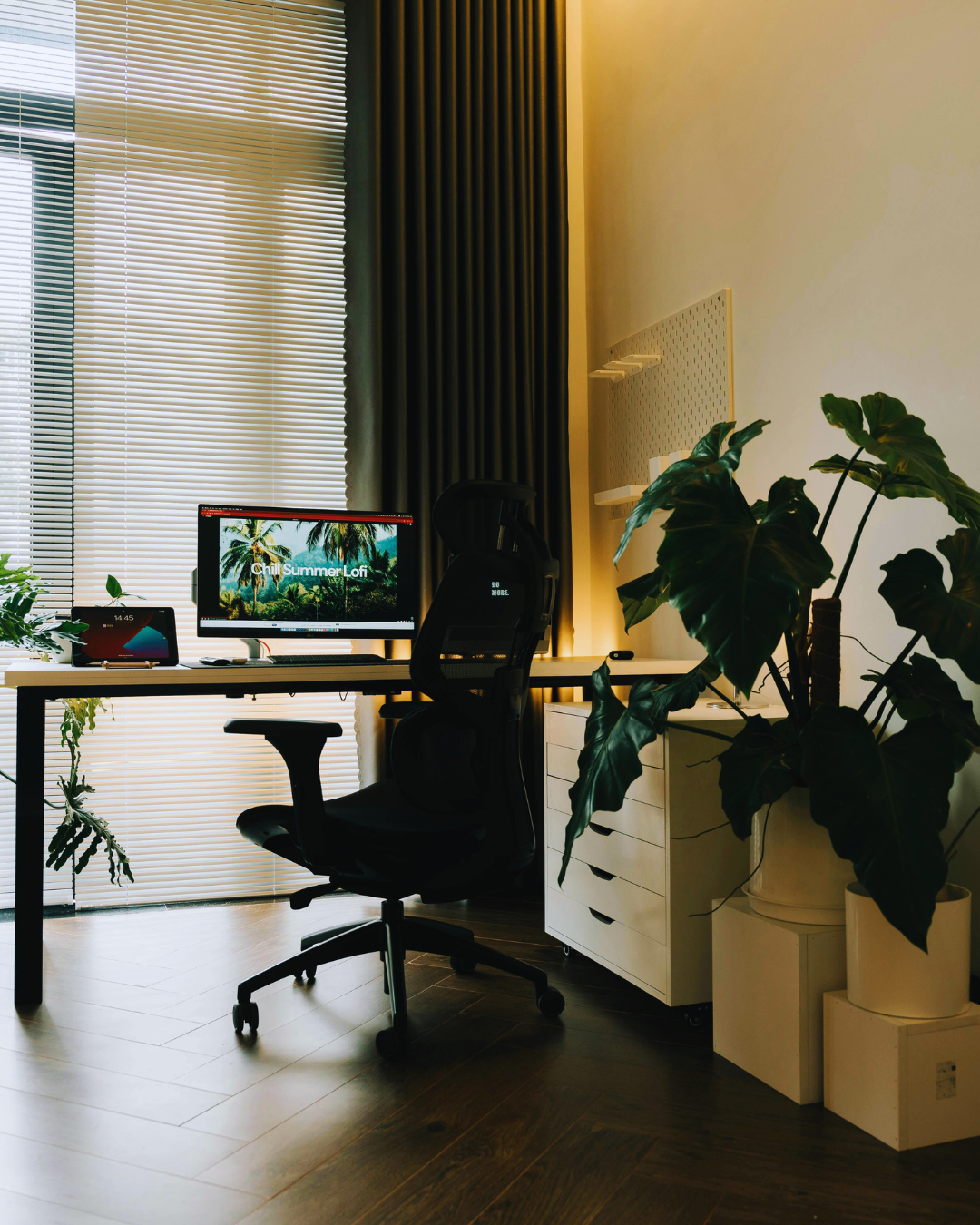
Creating a tech-friendly workspace at home means balancing functionality with comfort, ensuring all necessary devices are easily accessible and organised. A successful setup includes reliable internet, ergonomic furniture, and efficient cable management to reduce clutter and boost productivity.
They need to consider lighting and noise control to maintain focus during work. Incorporating smart tools and keeping the space adaptable for different tasks also plays a key role in building an effective environment.
By carefully selecting technology and arranging the workspace, anyone can enhance their efficiency and create a space that supports both work and wellbeing.
Creating an efficient home office requires attention to several practical elements. These include deliberate office design choices, incorporating ergonomic furniture, and organising the layout to balance comfort and functionality.
A tech-friendly home office supports seamless use of devices like laptops, monitors, and peripherals while accommodating work needs. It prioritises sufficient power outlets and strong internet connectivity to avoid disruptions.
Lighting plays a key role; natural light combined with adjustable artificial lighting reduces eye strain during long hours. Sound management through noise-reducing materials or headphones improves focus. The design often integrates a minimalist approach to reduce clutter and distractions.
The desk must fit the technology used daily. Desks with built-in cable management prevent tangled wires and keep the workspace neat. The size should accommodate multiple screens or devices without crowding.
The layout should promote efficient movement and access to essential tools while maintaining a clear work zone separate from living areas. Position the desk near windows for natural light, but avoid glare on screens.
Ergonomic furniture is vital to prevent physical strain. Chairs with adjustable height, lumbar support, and padded seats reduce back and neck discomfort. Desks with adjustable heights allow for alternating between sitting and standing, supporting better posture.
Accessories like footrests and wrist supports further enhance comfort. These elements contribute to longer productivity without fatigue or pain, crucial for remote work environments.
Functionality depends on organised storage solutions such as shelves or drawers to keep frequently used items accessible but tidy. Workspace accessories like monitor arms enable custom positioning, saving desk space.
Comfort also means maintaining a neutral colour palette, which reduces visual distraction and promotes calm. Adding personal touches within minimalist design criteria can improve mood without cluttering the room.
A tech-friendly workspace balances efficient use of devices with clear organisation. This involves managing cables to prevent clutter, using multiple screens effectively, and adopting smart storage methods that suit the available space.
Managing cables avoids tangles and creates a cleaner workspace. Using cable trays or raceways under the desk keeps wires off the floor. Velcro straps and cable clips bundle cords neatly.
For small spaces, wall-mounted cable organisers reduce desk clutter. Label cables to identify devices quickly. Power strips with built-in USB ports consolidate charging, limiting outlet crowding.
Regularly checking cables for damage improves safety. This approach reduces distractions and enhances device accessibility.
Multiple monitors increase productivity but require careful placement. Position displays at eye level with adjustable stands to reduce strain. Ensure adequate desk depth—floating or wall-mounted desks help save floor space and create a clean surface.
Laptops can be connected to external keyboards and monitors to maintain ergonomics. USB hubs keep peripherals organised and accessible.
Smart lighting around screens reduces eye fatigue. Customise screen brightness and colour temperature to match the workspace environment.
Using efficient storage solutions prevents tech gear from cluttering the desk. Pegboards mount tools and accessories vertically, freeing desktop space. Drawers with compartments separate cables, chargers, and small gadgets.
Incorporate planners or small shelves for organisation in small office areas. Labelled containers streamline finding items quickly.
Regular decluttering removes unused tech and outdated cables, maintaining a functional and neat environment.
A tech-friendly workspace improves focus and comfort by combining functional furniture, thoughtful lighting, natural elements, and balanced colours. Each aspect supports health and efficiency without distracting from work.
An ergonomic chair is essential for supporting posture during long work hours. Chairs with adjustable height, lumbar support, and cushioned seats reduce strain on the lower back and neck.
Standing desks provide an alternative to prolonged sitting. Adjustable models allow users to switch between sitting and standing, which can enhance circulation and reduce fatigue. Combining a comfortable seat with a standing desk promotes movement and decreases the risk of musculoskeletal issues.
Comfortable seating should also accommodate correct wrist positions to prevent strain, especially when using keyboards and mice. Prioritising ergonomic furniture is key to maintaining productivity and well-being.
Natural light boosts mood and alertness, so positioning a workstation near windows is beneficial. Direct sunlight should be tempered with blinds or curtains to avoid glare on screens.
When natural light is insufficient, soft lighting options like LED desk lamps with adjustable brightness help reduce eye strain. Warm-white lights tend to be less harsh than cool-white and support a calming work environment.
Combining natural and artificial light sources ensures consistent illumination throughout the day, minimising headaches and improving focus.
Incorporating greenery such as succulents and pothos plants enhances air quality and creates a calming ambience. These low-maintenance plants thrive indoors and require minimal care.
Nature indoors also reduces stress by establishing a connection to the natural environment. Small desktop plants or larger floor pots add visual interest without clutter.
Regular watering and appropriate placement near light sources preserve plant health and maintain the benefits they provide.
A carefully chosen colour scheme impacts mood and concentration. Neutral walls combined with pops of blues or greens can encourage calm and creativity.
Using soft, muted tones avoids overstimulation, while contrasting accents highlight key areas or objects without distraction. Colour balance supports mental clarity and reduces visual fatigue.
Including colours present in nature, like plant greens or earthy browns, complements indoor greenery and unifies the workspace aesthetic.
A thoughtfully personalised workspace can improve productivity and wellbeing. It needs practical adaptations that support both work commitments and personal comfort.
He or she should clearly separate work hours from personal time by structuring the workspace accordingly. Using a planner to schedule breaks and task deadlines helps maintain this balance.
Positioning the workspace away from resting areas reduces distractions and mental overlap. Natural light and ergonomic furniture also contribute to maintaining focus and reducing fatigue.
Including visual reminders or boundaries—such as a designated desk lamp only turned on during work hours—can signal transitions between work and relaxation. This simple cue assists in reinforcing routine and managing stress.
A reading nook within the home office boosts mental breaks and encourages downtime, which is essential for sustained focus. It should have comfortable seating, such as a cushioned chair, and sufficient lighting tailored for reading.
Adding shelves to store books and magazines relevant to work or leisure fosters easy access. Including a cosy throw blanket caters to comfort, particularly during colder months.
This zone should feel distinct but accessible, allowing the user to quickly shift gears from high-intensity tasks to moments of calm. Proper design minimises clutter and maintains a clear boundary from tech-heavy zones.
Controlling sound distractions is critical in a tech-friendly office. Using acoustic panels strategically placed around the workspace reduces echo and muffles external noise.
Soft furnishings and rugs complement this effort by absorbing sound, further enhancing concentration. Noise-cancelling headphones are an option when physical modifications are limited.
Placing these solutions near windows or doors targets common points of disturbance. Consistent sound management creates a predictable environment, which is conducive to prolonged focus.
Comfort and personal style contribute to a productive atmosphere. Integrating ergonomic cushions or footrests promotes physical ease during long sessions.
Decorative items like plants or artwork personalise the space while avoiding visual clutter. Indoor plants also improve air quality and offer a calming, natural presence.
He or she should balance aesthetics with function by choosing decor that supports well-being. Simple additions like a neat desk organiser keep tools at hand, further reinforcing efficiency.